
For novelists writing books long enough to lose track of

By chapter thirty, you've forgotten what color her eyes were in chapter four. Your readers haven't.

Write your story. We'll keep the notes. StoryClerk is a writing app that reads each chapter you finish and builds your story bible for you: characters, places, relationships and world rules, each one linked to the line it came from.

  • ✓ No forms to fill in
  • ✓ Every fact shows its source
  • ✓ Knows every book in your series
  • ✓ Never writes your prose unless you ask

Want a writing buddy to brainstorm with? The Writing Assistant can draw on the earlier books in your series. Want silence? Turn it all off and the notes still build.
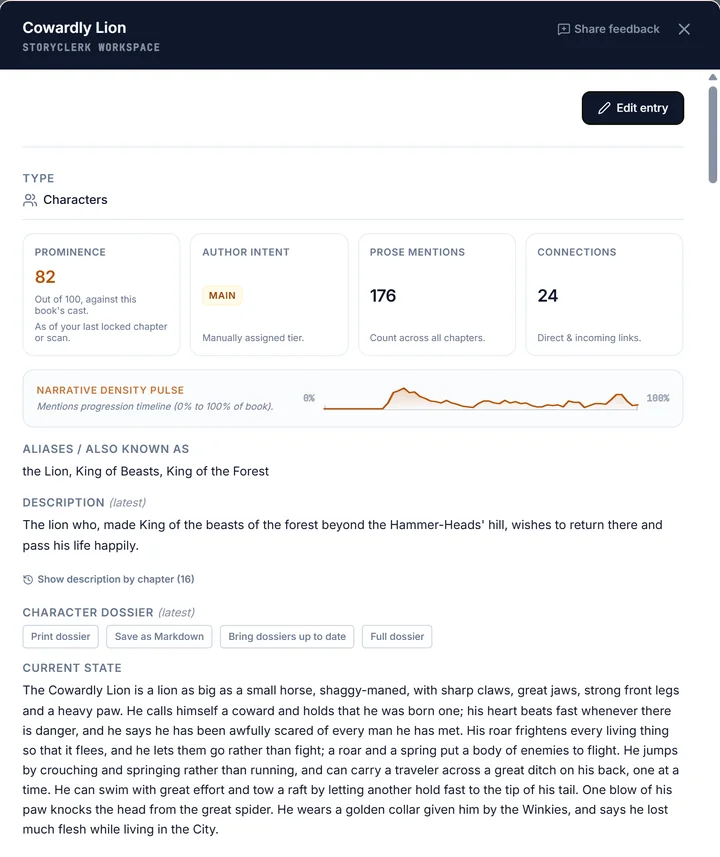
The World Compendium entry for the Cowardly Lion in The Wonderful Wizard of Oz: prominence, prose mentions, connections, a mentions-over-time pulse, his aliases, a description, and the opening of his character dossier describing what he looks like, what he fears and what he can do.
A real character card from the sample book, The Wonderful Wizard of Oz: built from the chapters, with the start of his dossier.
Start writing free See it work on a real chapter

Free plan, no card. Fresh credits every month. Standard is $5 a month, Pro is $15 a month, plus applicable tax.

Plotting a novel? See how it works on the plot board (the Story Canvas) ↓
Plot your novel visually, step by step

Plot your novel on the Story Canvas

Start from a proven story structure instead of a blank page. Four steps, and the first one takes a minute.

  1. 1. Pick a plot structure

    Three Act, the Hero's Journey, Romance, Mystery, Seven Point, Story Circle and four more. Press Structure on the Story Canvas and every beat of the shape you pick becomes a question card on your board.

  2. 2. Answer each beat in your own words

    Or describe your story in a few lines and let the Writing Assistant brainstorm an idea for every step, for you to keep, change or throw out. Nothing is written into your book for you.

  3. 3. Drag the cards onto chapters

    Give each subplot its own thread, so you can see at a glance where a storyline goes quiet. Switch between Grid and Outline, and zoom out to the whole series.

  4. 4. Write beside your plan

    The outline sits next to the manuscript, not in a separate app. As you write, StoryClerk keeps the notes: who appeared, what changed, and which thread you dropped.

You'll know within a chapter whether this is for you.

  • You're past 40,000 words and you've started scrolling back to check things.
  • You're writing book two, and book one's details live in your head, a Word doc and three Notes files.
  • You started a story bible, filled in four characters, and never opened it again.
  • You have a mystery where six people could have done it, and you need to know who knew what, when.
  • You want the notes kept, but you do not want anything writing your prose.
  • You have a finished draft and no idea which threads you dropped in the middle.

Any genre. Fantasy and sci-fi, mystery and thriller, romance, literary and historical. If it has people, places and a timeline, StoryClerk tracks it.

Straight answers, before you sign up

Will it write my book for me?
No, but it will help you write it. We don't believe in AI slop and don't support it. StoryClerk helps you do what only you can do: write. It keeps your notes, catches what slips, helps you plan your plot and organize your ideas, and brainstorms with you when you want to work an idea through. In the two quieter modes, Quiet Clerk (no assistant at all) and Human Certified (feedback only, never writes your prose), it stays out of your manuscript, and it keeps the notes either way.
Is my manuscript training data?
Never. Your manuscript, your notes and your brainstorming are not used to train any AI model — ours or anyone else's — and they are never sold or shared. Your ideas stay yours.
Do I have to move my book here?
You write in StoryClerk. Bringing a draft is one paste, and you can take everything back out in one click.
Can I get it back out?
Any time. Everything to a zip, or your manuscript to a Word file or an e-book (.epub), in one click, with a live copy in your own Google Drive. No proprietary format.

Your words stay yours. StoryClerk never uses your manuscripts, characters or notes to train AI models — ours or anyone else's — and never sells or shares your work. The full commitment is further down this page.

Questions authors ask

Can StoryClerk build my story bible from my manuscript?

Yes. When you finish a chapter, the Lore Scan reads it and files the entries for your World Compendium (Story Bible), your character and world notes: characters, places, items and the rules of your world. Each one cites the passage it came from. Accept them all in one click, check them one by one, or let a whole-book scan file them for you automatically.

Can I see where each fact came from?

Yes. Facts come with their passage: open an entry and you can see the chapter and the line it was drawn from. A few facts rest on no single quote, and those are shown without one rather than with an invented source.

Does it work across a series?

Yes. Your work is organized as Universe, Series, Book, and each fact keeps the book and chapter it came from, so a detail from book one stays traceable to book one. A series comes in one book at a time, each placed in its story order.

Can it help me plan a novel before I write it?

Yes. Start from an idea on the Story Canvas, where you shape the premise, plot threads and key scenes as cards, with the Writing Assistant to brainstorm beside you. You can also work in an outline view of the same plan.

Can it track my foreshadowing and payoffs?

Yes, as plot threads on the Story Canvas. Each thread gets a lane across your chapters, so you can see what you started and what is still waiting, and threads that have gone quiet stand out. It shows you the shape of the book; you decide where each one pays off.

Can it find continuity errors and plot holes in my book?

It looks when you ask. The Continuity Check is a focused pass on plot holes, timeline and internal logic, and the Lore Scan flags places where facts disagree. You decide what to do with each flag.

Can it review my chapter and check grammar?

Yes, both. The Editorial Review Board critiques the chapters you pick from several angles, and the grammar check lists suggestions you can jump to in your text. Both run when you ask them to.

Can I hear my book read aloud?

Yes. Read Aloud gives each character a voice of their own and the narration another, and it tells you where it cannot tell who is speaking so you can tag those lines. Your browser's voice is free on every plan; StoryClerk's own voices come with Standard and Pro, and reading a whole chapter or book aloud, with download, is on Pro.

Can I write every word myself?

Yes. You choose how involved StoryClerk is: Writing Assistant has everything on and is where you start, while Human Certified and Quiet Clerk do less. It only writes prose when you ask it to, and in all three it keeps the notes.

Is my writing used to train ChatGPT, Claude, Gemini, or any other AI model?

No. Never, and there are no exceptions. This applies to our own systems and any third-party providers we use to power features — none of them train on your data, by contract.

Does StoryClerk read my manuscript?

StoryClerk's automated systems process your manuscript to power features like the Lore Scan and your World Compendium (your book's characters, places and facts). No employee reads your manuscript unless you explicitly share it with us — for example, by attaching content to a support request.

Can other users see my manuscript?

No. Your manuscripts are private to your account by default.

What happens to my data if I delete my account?

Your account and data are permanently deleted 30 days after you ask (you can cancel until then), and backup copies expire within another 30 days.

Everything StoryClerk does, and all of it is on the Free plan.

Items marked (uses credits) draw on the monthly credits every plan includes.

Writing

  • Manuscript editor with focus mode, and typing that never waits on the network
  • Chapter tree you reorder by dragging, with status tags
  • Paste a whole manuscript and split it into chapters in one pass
  • Formatting cleanup for text from Word, Docs, a PDF or an e-book, shown before it is applied
  • Personal and series dictionaries for the names you invented
  • British or American English, set per book
  • Consistent spelling across the book, and style checks counted per chapter
  • Word counts, daily targets, finish dates and optional streaks
  • Front and back matter pages, left out of every scan
  • Light and dark themes, seven color palettes or your own, typefaces and workspace scale
  • Start writing, bring in a manuscript, or plan first, with sample books to try
  • Grammar check, with suggestions saved per chapter (uses credits)

Story Canvas

  • Story Canvas: a lane for each plot thread, a column for each chapter, quiet stretches shaded
  • Series, book and chapter views, and an Outline view to print or save as a PDF
  • Follow one character or place through the plan, or two together
  • Idea piles and a free Wall for cards with no chapter yet
  • Pin a card to the exact line it is about
  • Mark the parts you have not worked out, and see everything still open
  • Start from a story structure (Plot Template): Three Act, Hero's Journey, Seven Point, Story Circle and more, each step a question card
  • Brainstorm an idea for each step of a structure with the Writing Assistant (uses credits)

Book Overview and Compendium Overview

  • Lore Scan of each finished chapter, nothing filed until you say yes (uses credits)
  • Scan a whole book in one run, and undo the whole run (uses credits)
  • World Compendium: characters, places, objects, factions and rules, editable by hand
  • Every fact keeps its chapter, and the passage behind it
  • Read any character as of the chapter you pick
  • One world across a series, each fact keeping its book and chapter
  • Relationship map, redrawn as of any chapter
  • Inline @ mentions and hover cards in your prose
  • Names with no entry yet are flagged, one click to add
  • Earlier chapters are never read with later ones in view
  • Narrative analytics: where everyone appears, who shares chapters, who speaks how much
  • Reference Desk: timeline and every name in your book, with counts
  • Reference Desk questions, answered with quotes from your book (uses credits)
  • Chapter Overview scene by scene, Book Overview and Series Overview (uses credits)
  • Compendium Overview (search, relationship map, boards, saved searches)
  • Character dossiers (uses credits)

A second read

  • Continuity Check: plot holes, broken rules, timeline slips, changed facts (uses credits)
  • Editorial Review Board: pacing, character arcs, plot and impact, each note anchored to its passage (uses credits)
  • Reading Panel: three beta readers who quote the lines that moved them (uses credits)
  • What's Working: the passages that land, and why (uses credits)
  • Iceberg Analysis: subtext and character psychology (uses credits)
  • Turn any review note into a note pinned to its passage

StoryClerk Chat

  • Draft and Brainstorm chat that reads your whole book or series (uses credits)
  • Brainstorm with your Story Canvas cards in view, and suggestions for each card (uses credits)
  • Selection rewrites, shown side by side before anything changes (Writing Assistant mode) (uses credits)

Read Aloud

  • Read Aloud with your browser's voice
  • Who is speaking: every spoken line tinted by its speaker, unclear lines marked

Audiobook

  • Retail sample, package list, and download of audio already made
  • Mark front and back matter pages, leave pages out of the audiobook

Your work stays yours

  • Three assistance modes: Quiet Clerk, Human Certified, Writing Assistant
  • Your writing is never used to train models, sold or shared
  • Offline drafting that syncs when you are back online
  • Trash keeps anything deleted for 30 days
  • Backup to your own Google Drive
  • Export as a zip you can restore from, a Word file, or an e-book (EPUB)
  • Printable Manuscript Blueprint, World Compendium and Book Overview

Put one chapter in and see what comes back.

Bring the draft you already have — the importer splits it into chapters and repairs what the conversion broke. Finish one chapter and look at what it found.

Free plan with monthly credits, no card required. Standard is $5 a month and Pro is $15 a month, plus applicable tax; their unused credits roll over, up to three months' worth. Need more? 4,000,000 credits for $10, plus applicable tax. Verify a card (nothing is charged) and the Free plan gets an extra 250,000 credits, once.

Published authors: get in touch and we'll talk about loading your published books for free. [email protected]

Compare Free, Standard and Pro
FreeStandardPro
Price$0$5 a month$15 a month
Monthly credits50,0002,000,00010,000,000
Unused credits carry over, up toNo, refills to 50,000Up to 6,000,000Up to 30,000,000
Chapter versions
Automatic versions, per chapterNone550
Named versions, per chapterNoneNone100
Restore points, per chapterNone1010
Read Aloud
StoryClerk Read Aloud: free characters each month, then creditsNone50,000250,000
Choose a speaking style for built-in voicesNoIncludedIncluded
Download what was just readNoNoIncluded
Read a whole chapter or book aloud, and download itNoNoIncluded
Writing
UncensoredNoIncludedIncluded
Audiobook
Make audiobook audio, including opening and closing credits pages (Studio Audiobook Credits)NoNoIncluded
Voice design: casting allowance each month (Studio Audiobook Credits)NoneNone5,000

* Studio Audiobook Credits are bought separately from StoryClerk Credits.

** Turn on per universe; the Writing Assistant writes explicit scenes in full in Brainstorm and Draft. Adult fiction is welcome on every plan. The hard limits in the Terms still apply.

Everything above is on every plan. The table shows only what changes between plans.